Showing posts with label Gifted and Talented. Show all posts

Thursday, 17 March 2016

Tarsia: Learning from colleauges

At the start of a new year, we were joined by 3 motivated and talented new staff members in our maths department. They have showed me many new things, and I love learning from colleagues!

One of the new members introduced me to Tarsia (Free and easily accessible here) which is a marvelous technology which can allow us to pivot problem solving.

Essentially the software converts a series of equations (shown in table form below) 

and turns them into a puzzle.


Each piece is a triangle (with 3 expressions along each side). The goal is to pair the expressions, so the pieces become a shape (typically either a triangle or a hexagon)


In my class I wanted to use this activity to practise what we had learnt about surds and index laws.
I decided I wanted to ensure this activity did not 'crowd out' the quiet students, so I enforced a silent work.


I created and printed off puzzles of 3 difficulties (Green for easy, Yellow for moderate and Red for hard). I set up the classroom with tables of 4-5 with a puzzle on each and let students challenge themselves at to which colour they attempted. The students were to use their exercise book to work out the answers, and could show their peers their working, but could not say a word!

(There is little in this world more beautiful than watching students yearning to discuss their mathematically reasoning)

As puzzles were solved, there were fist pumps and muffled cheers (shhh!!) but perhaps more fun was the smiles of pride of completing a puzzle. As students completed, I allowed them to naturally swap desks, most moved up to the harder puzzles.


I feel that the limitations of silence and only having 4-5 students per desk, were key to encouraging collaboration and group problem solving.

As I researched this software further I found that Mr Barton's website and blog, provided a wealth of further development ideas.
 Why not put in a mistake,
  or an omission on one side,
   or faux equations around the edges of the shape,
    or multiple possible solutions.

Oh the opportunities to develop a simple activity a more thorough and robust learning experience.

I look forward to the next topic where I can explore this program further and try some more advanced applications of the triangle.


Saturday, 5 December 2015

Interactive online revision tool

For some time now I have felt that revision has too often been assigning students piles of practice questions. For a change, in addition to the assigned revision questions I produced an Interactive online revision page using Sway (My original post on this is here)

The student results spiked. It seems that when students are reviewing a maths topic it is better for them to have visual and interactive tools to explore and extend the concepts they are preparing for.

This is one of my favorite examples with interactive cards plus videos and pictures.


I have also loaded it for others to see at:
https://sway.uservoice.com/forums/266643-show-us-your-sway/suggestions/10975671-revision-canvas-for-year-8-mathematics-students

From a maths point of view I have found the ability to embed Geogebra materials into the Sway are valuable and easily found at https://tube.geogebra.org

The process is quite simple as follows:

1) Find the activity you want to include in your sway.

2) Click on the share button in the top right of the window.


3) Then copy the embed code to your clipboard.


4) In your Sway, Select "Cards" from the top and scroll down to "Embed"


5)  Then simply Paste from the clipboard, into the description (it even says to tap here are paste)


6) Click on Play or Preview, to see the embedded content in action.

I found it quite rewarding and so did the students when they were playing with these carefully selected activities.

Let me know how you go using Sway and embedding content in the comments.


Friday, 4 December 2015

Box Optimisation

This was my penultimate lesson with my Year 11's Maths Methods class, it was perhaps my favorite lesson with them (accidentally left the best for last).

Inspired by a Question from the Sadler Mathematics Methods Text book and some photos Mr Woo shared recently, I undertook an activity with my class. I broke the students in to groups. Each received

  • 1 set of scissors,
  • 1 glue stick,
  • 1 ruler,
  • 6 pieces of colourful A4 paper.

and kindly lent from the Science Dept:

  • 1 set of digital scales and
  • 1 bottle of plastic fragments (but could use sand, rice or grains)


The first task was for students to convert the 6 pieces of A4 paper into 6 different sized boxes/baskets. This involved cutting squares of various sizes from the four corners (with the students measuring each square to be a set number of centimeters. (The larger the square the deeper the box.)


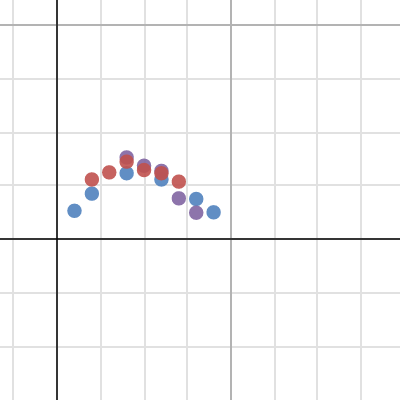
Students then put their boxes one by one on top of a set of scales and poured in plastic fragments. Once the students had documented the weight of the bits that each box could hold, they plotted these coordinates (with x being the size of the corner squares in cm, and y being the weight in grams)


Above is the points plotted by the students (different colours for different groups) As the examples above shows, after ~4cm the capacity of the box is reducing for any increase in size of the corner squares. This was good, but the real learning was yet to come.

Next we looked at the formula for the volume of each box. Students were able to recall the volume of a rectangular prism (from Year 8) is equal to length by width by height. We took one side of the corner square and labelled it "x", given A4 page is 21cm x 30cm, they identified that volume must be:

Height: x
Length: 30 - 2x
Width: 21 - 2x

Volume: x(30-2x)(21-2x)

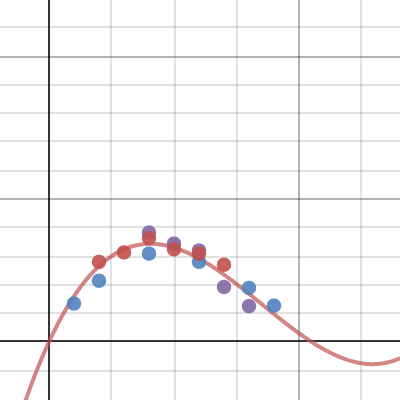
Students graphed this function on top of the plotted points, and found that they didn't match. Why?
Much discussion, starting with students blaming the tools, then blaming each other and even blaming the graphing software. Until one pointed out that they were graphing different things.
The coordinates are the weight, and the function is volume.

As students realised this I asked how could we convert from volume to weight (covered in Year 9).

"We never learnt the formula to change between Weight and Volume" Really? Did anyone?
"I think that 1 litre weighs 1 kilogram" Does it? For all substances?
"We could weight a 1 litre jug?" Sounds good.

After a few measurements the students worked out that the plastic bits we used, weigh around 0.3 grams per cubic cm. Can we can transform this graph to approximate our findings (as we did in Year 11)?

What do we need to do? Translate or Dilate? Vertical or Horizontal?


(Dilate Vertically, by multiply 0.3)
https://www.desmos.com/calculator/ykreaoty9d

Finally my challenge was to find and create the maximum sized container. Using calculus techniques, the students found the stationary point at around 4cm. 

The lesson covered geometry, graphing, transformation of functions, calculus and problem solving using both hands on and ICT tools as part of group work. Although it required considerable teacher direction, this lesson was demonstrated every aspect of a lesson I try to include in my lessons and it was a wonderful success.

Saturday, 7 November 2015

Player Types in Gamified Education

Having started down the exciting paradigm of gamification in education, I did a little research into some gaming theories...which I have set apart from gamers' theories (which can be NSFW)

One of the interesting theories, which comes from Richard Bartle, coined the Bartle's Player Type. This  concept is based on 4 player types (or eight depending on sources) which are split across 2 variables being:
between acting on or interacting with, and
being in respect to other players or the game's world.

The four types are shown below:


Each of these player types is based on what their objective is, and how this impacts on how they play games. There is a surprising amount of further research and discussion of this concept, most of it directed at game developers. There are papers looking at how the proportion of one player type impacts on engagement of other player types, and how the mechanics, design, management of the game influences the break down of these player types, and the optimal proportion for different game genres.  


My focus of research on this concept was looking at how these 4 types exist in a classroom.

Achievers have been the general winners of traditional classroom. They want the grades and want to attain all of the content.
Socialites enjoy the topics based on discussion and interaction, typically humanities subjects. They enjoy classrooms based on group work, however can be disruptive when individual work is required.
Explorers often seem to be the gifted students that are happy to do independent study into a specific area of the content. This can be good, however can become too disruptive when they need to complete the assigned tasks.
Killers commonly miss out in classrooms. They seem willing to fail, so long as others are failing more, and care more about their rank than truly understanding the content. They may not sound like the optimal student, but they still have a place to contribute and learn in classrooms.

Accomodation of player types
Achievers
Using badges and accumulated points which are typical of most gamified classrooms, appeal to the Achievers. These need to include short, medium and long term achievements to maintain the interest.
Socialites
Included list of activities which allow everyone to see the activities and successes of others students, and perhaps with either likes/upvotes/+1's or even short comments encourages socialites to celebrate the success of others.
Explorer
Providing ability to unlock esoteric aspect of the content can help engage Explorers. As achievements are complete, perhaps an offshoot activity is available to explore something optional that most ignore. Killer
Setting up competitions, particularly ones with stakes will interest the killers. Can they gain some points by out scoring someone in an activity. These need to be carefully managed to avoid upsetting the Socialites.

I am still trying to develop games to activate all of these learners, but would appreciate any thoughts and advice either in the below comments or on twitter at @jarradstrain

Friday, 9 October 2015

Algebraic Super Heroes

Introducing algebraic law can be boring for students... and for the teacher too... well it is a rather dry topic.
Students struggle to see the point to remembering which law Associative or Distributive Law, and how do you even say Commutative (are you sure it isn't Communicative or Communitative?)
And the real point of empowering student with tool to do Algebraic Manipulations, is lost to repetitive matching exercises.

As Algebra becomes increasingly complicated understand in higher year levels what can (and can not) be done becomes more important.
Visual aids are very helpful (Mathisfun.com has some good visuals here) but to introduce more visual thinking and introduce some Art into Maths (STEAM instead of STEM), I challenged the students to develop some superheroes with the powers of relevant Algebraic Laws.


The students were given a piece of paper and some pencils, and as we described Algebraic Laws, they were to draw a super hero who demonstrated the law in some way. They had a lot of freedom to use creativity. A few students decided they wanted Sports Stars and others created Super Vehicles while some were happy just sticking with various super heroes.


We started with Commutative Law. We discussed the law, reviewed some visual representation. Some students quickly had ideas, others waited for my example, which swung across the screen... it was Commutative Chimp, from the example many students started creating.


I gave the students a few minutes to get started... long enough to get an idea down, but not to finish the 'pretty' drawings. 

 All students had to pause, and then I presented Distributive Law... this time I saw more students with interesting ideas starting before I finished the visual explanation. I would usually stop them, but they were very keen and clearly running with idea so I just ensured that any other students could hear the instructions.
My second example came bounding across the screen; Distributive Dog.


This time I gave the students slightly less time. All the class had come up with interesting ideas and were very keen to show them off. I didn't want too much sharing (not yet!) so I continued on to our third and final law.. Associative Law.

Again description, then visual representation and finally a sneaky Agent Associative example.


The students were very keen to create attractive and accurate posters to describe their Super Heroes (or similar characters).

I set a timer for 8 minutes for students to see the time counting down and to manage completing their creations.
When the time ran out, I got students into groups of 3 (or less). Each group allocated a member to be A, B & C. 


I explained that we were doing a sharing Gallery (like an Art Gallery). We got all the students to BluTack their posters, with one Wall for A, one for B and another for C.
As a class, we all started at "Wall A", we reviewed the posters and could discuss with the artists. Were there any Super Powers that were incorrect? 
Did we really understand the Laws?

Really the Gallery was for checking understanding, but students were proud of what they created and we keen to share.
At the end of the sharing students were permitted to take their posters home (and many put them in their revision folder for future reference.)

In some ways it may have been better to give all of the laws upfront and let students free with them, but giving one at a time ensured focus and allowed each additional law to be a type of iteration for improvement.
I feel this was a good lesson to give students a creative outlet in Mathematics and differentiate learning for some students could repeat the teacher's examples while other could create truly new and innovative characters.


Sunday, 4 October 2015

Angle Chase Quiz

After having spent some time with students learning about relationship between angles, parallel lines and internal angle of shapes, the questions all seem to start looking the same. However when I came across a series of Angle Chases on Cut-The-Knot.org (http://www.cut-the-knot.org/WhatIs/WhatIsAngleChasing.shtml) I found it quite engaging, and *spoiler* so did the kids.

One of the particularly interesting angle chases is embedded below.


I took the fourth diagram and loaded it into an online quiz (using Socrative). The Socrative quiz includes images for the students to work along with as well as give students immediate feedback on what the correct answers are (I think I got them correct). You are welcome to use the quiz by logging into Socrative.com and import the quiz SOC-16913178.

The Angle Chase allows students to build on what they have discovered through the exercise (building on the "Epic Meaning" of the activity) and presents the questions in a manner different to the way textbooks generally structure these type of questions.

From a teacher's point of view keeping a track of student's results is vital. Socrative automatically tracks the student's attempts. This allowed me to export the results and check where the students are up to (with names removed below is the report). 


The class results showed that up to angle "h" most students performed well, and then students had mix results. Angle "j" and "r" both achieved less than 30% of correct answers so as a class we discussed these angles, allowing the high performing students to explain their thought process and teach the students which did not correctly solve those angles.

Running of the angle chase took around 20mins, after which some students had completed all angles, and others were beginning to lose focus. At the end of the activity many students asked for more, so I allowed them to work through the other diagrams in Angle Chase diagram.

Wednesday, 15 July 2015

Online Canvas for revision

The test is coming up... how do I give my students the best way to revise the content?

For previous revision lessons we prepared mind maps, flash cards and revision sheets, but this time we will be using an online canvas covering all of the content, with links to various informative and interactive sites to support the students preparation for the test.
This was something different for the Year 8 Class, and they seemed to really enjoy it.

When we got into class, I shared the link with the students. Different students gravitated to different aims of the sway. As I circulated the classroom, I could see where each student was focussed.

Some went straight to the chapter review test, others diligently created their own revision pages in their workbook from the canvas and some went straight to the interactive games and websites that I had linked to. This allowed for a differentiation based on student preference.

As I circulated the classroom, I encouraged student to focus on areas that they were not sure of and I knew that some students had missed parts of certain topics. Interestingly most had naturally tended towards areas that they had missed.

For homework, I suggested that there was a mistake in one of the pictures on the canvas- they needed to find it. I do this to encourage the students to question and ensure they truly understand the content.

The students interestingly found two, and returned with a range of great questions (highlighting where further clarity is required).

Feedback from students was that they found Sway useful and for me it took limited effort to create.


You can see my Sway below or per the link.
https://sway.com/XtWfvGwyrV3Fp4SO


Creating the Sway was incredibly easy. I logged into Sway.com (with my free Microsoft account) and named the Sway "Year 8 Semester 1 Revision", set headings for each topic, then I clicked Insert. Sway was able to search the internet and recommended pictures, videos and even wikipedia snippets that related to the content.


Working through the topics was as simple as drag and dropping the images, videos and embedded interactive objects about the content into the canvas. As I identified specific aspects of the topic, I was able to search and find precisely the material I wanted. 


Once I was satisfied that all content was covered, I turned to the look and feel of the canvas.
There is always the option to leave it chance and click "Remix", but I wanted to be a little more directive. I arranged the navigation to be vertical and selected the font, colour and background that I wanted.


Overall, I found Sway to be quick to create, valuable to use and easy to share with my students. I have already used this with my year 10 class as well as year 8 classes, all with plenty of success. I certainly will be using it again.

Sunday, 7 June 2015

Visually Balancing Equations


When I am teaching students a new concept it quickly becomes clear when students have been taught what to do rather than why or at least how it works. Recently this situation become clear when performing Inverse Operations;
The students ask-
Why do we switch the sign when we switch the side of the equal sign? 
Why do we need to perform our Inverse Operations first on the addition, before multiplication? (We have just learnt the Order of Operations (BIMDAS/BODMAS)

I find that when students understand that they need to keep the equation balanced, that they develop a robust understanding of how inverse operations work, and why we can perform the operations we do.

Balancing equations is a pretty simple, and quite visual concept. I have seen a number of sites and games (mostly aimed at primary school level) using scales to consider how changing one side, needs to have an equal change on the other side.

But then I came across a different site. It had a simple, interactive and attractive site that invites students to be play and which flips the scales idea on its head.

Solve Me Mobiles (solveme.edc.org/Mobiles.html) uses mobiles (like those hanging above a cot) to balance the equations.


The site allows users to access a hundreds of balancing problems. Running from the simple to quite complex arrangements, with multiple variables and simultaneous equations. It is not intimidating, in fact some students thought it looked too simple (until they started trying to solve the more difficult ones).

On the face of it this is a very simple exercise. Guess the weigh of each shape, while animations of cloud and seagulls gently float by, and at first it is. The first level the students need to find 2 numbers that are equal and together equal 10...


But as they start to become more complicated the tools the site provides becomes valuable.


Students can click and drag the mobile, to create equations.
Once they have the equations, they can subtract(or eliminate) items which naturally happen on both sides.
The site also allows for prime factorisation, with factors also able to be 'eliminated' from both sides (effectively dividing both sides)
Through these operations the maths comes naturally and visually allowing students to solve the equations.

The balancing of equations can then be expanded through moving into simple simultaneous equations, when there are multiple bars, and increasing number of objects/variables.


This structure then allows for substitution, again through natural drag and drop approach. This allows the user to isolate variables to solve.

The students quickly took to the problems, with flexibility for some students to pick a range of difficulties to match their ability.

The lesson flew by, with my time as the teacher, simple offering leading questions to students as they find themselves on a bump, before jumping up to the next level.
"Are you sure you have all of the possible equations from that set up?"
"If the left arm is balanced with the right, the left arm must be half of the total?"
"What could you substitute to isolate an object?"

I found that I needed to direct students towards the correct vocabulary, but whether they were eliminating variables, or "flicking bits", they understood the mechanics and the limitations.

As we summarised the lesson, we found that different students were applying a range of strategies to solve the puzzles, with some focused on equations, others applying a halving logic, and others aiming to isolate each object.
This really highlighted how important communication and willingness to try new approaches was.

I created 2 mobiles (one challenging {solveme.edc.org/?mobile=2726} and one impossible{solveme.edc.org/?mobile=2741}) and shared them with the students, and as an extension opportunity I suggested they create one challenging and one impossible mobile, and provided a discussion board so they could share them. The discussion and the learning continues as they explore why some may be impossible to solve.

Thursday, 4 June 2015

Solving equations physically

I enter the classroom, with a bag of cash, a small digital kitchen scale and a glint in my eyes.

I don't need to even need to ask the question, the students ask for me.

"How much cash is that?"

Without skipping a beat, I put the coins into a cup and put it on the scales...

3320 grams

Well there is a tricky problem. How many coins does it take to weigh that much?

The students split into 4 groups, each with 2 cups with difference selection of coins in each. We weigh each cup and then after subtracting the weight of the cup (5 grams), the students developed equations to represent the weights.

Let "a" be the weight of 5 cent coin, "b" for 10 cents coin and "c" for 20 cent coin.
4a + 5b + 2c = 310 grams
3a + 2b + c = 210 grams

The students attempted to discover the weight of each coin, through application of a range of algebraic techniques.
Given the 3 variables and only 2 equations, they find it impossible to solve, until eventually one group shares with another group, and the class as a whole understand that sometimes, the answer requires asking someone else.

Finally some answers start to emerge... however there are still differences from groups. Once all groups have had a chance, I get each group to submit their answers and we create a simple table on the white board.

A students calls out, "We should average them"

(I hadn't planned on that but what a brilliant idea)

"Great... how do we do that?" I innocently inquire.

"Sum them, then divide by four" The chorus replies.

So I add another row, for Class Average, as the students call out the numbers.

How could we check?
Well who makes these coins?
Lets look up the Royal Australian Mint
(http://www.ramint.gov.au/designs/ram-designs/5c.cfm).

Despite the questionable quality of the scales, minimal quantity of coins and potential for algebraic mistakes the class average arrive within 0.2grams for each coin. I think to myself, well there goes my discussion on sources of errors, but one student notices that a group has consistently predicted nearly a gram too high for all of the coins. What could that be? The students happily provide suggestions, and the list creates itself.

With time vanishing, and students generally feeling positive, I don't feel like I even need to answer the original question. Instead it is time for some reflection...

1) What did we just do?
2) What skills did we use?
3) What new did I learn?

I circulate to get a feel for how students went. The response was clear. The more capable students had been working through the problem and developing their ability, however the lower ability students required considerable scaffolding. The activity simply led to frustration for the lower ability students.

While having a problem solving activity, for groups running over a whole lesson allowed the high performers to shine through persistence and application of logic, it had let some lower abilities coast. Perhaps they had seen something new, or perhaps they will recall the activity in future discussion, but they didn't feel ownership over the solution.

This lesson was great, but next time I need to be more aware of when students are letting the stars of the team carry the rest.

As a final thought- I was glad that I weighed the coins initially. It gave me an easy way to check that all of the coins had been returned (which they were).

Monday, 1 June 2015

Team Quiz for Trigonometry Revision

Two weeks of Trigonometry can cover a lot material, but how much do the students remember?
As high performing year 11 students completing the Maths Methods course (One of Australia's more challenging Mathematics Secondary Curriculum). These students are already quite motivated and engaged in the subject however as the teacher I really need to understand what students are understanding and can apply.
So it is time for a class quiz, but let's make this one fun...

I put the students get into teams of 2-3 students. Each team uses a laptop to log into Socrative.com, where they join my room. I ask that each team include the name of all team members, but this is only for the teacher to know, because teams are allocated a colour, which they will see more of shortly.

Once students have entered a name, they find out their team colour and begin answering questions...


As the students submit their answers, they receive immediate feedback, with the correct answer (and an explanation of the solution if loaded in for that questions).

Perhaps more engaging for the students is the Space Race going on the Big Screen. Every team has a rocket ship (assigned by their colour), starting on the left of the screen and slowly proceeding across to the right. How do they move their ship? Simply by getting the questions correct.


The timing of the questions is up to the students, however they quickly become curious of who is that Teal team that is winning, or Lime team which started slow, but is going faster now!

The students have a range of strategies, noting that in this quiz there are only 20 questions, and 35 minutes to complete it, getting each question correct is perhaps more important than getting them completed quickly.

What is the teacher doing during the frenzy of the quiz? Moving from group to group, I get insight into the problem solving approach of the students. Encouraging all team members to attempt each question, then to compare answers prior to submitting. This allows students to learn from one another, while picking up on errors.

When the timer ends (manually by the teacher) then we can get an immediate insight into the results.

Names are usually shown on the left. They have been hidden for student privacy

As a class we seem to have some misunderstood question 6, so I click on the question to discuss as a class.


I can immediately see that 9 groups got this question correct, so I call on them to explain the correct answer. One group quickly draws up a unit circle to show the angle in relation to Cosine (as the x coordinate), then another group disputes the answer by showing a Cosine wave, showing the value on the y axis.

Seeking teacher mediation, I explain that both approaches are correct and how they reach the same result. The discussion results is numerous 'ahhh's of realization from students, particularly some of the lower performing groups. It seems many understood Sine better than Cosine, which this quiz brought out.

We move onto the application questions, many included images as part of the question. This demonstrated the students needed additional time on problem solving involving various trigonometry rules.

Looking through the questions, (such as question 12) students simply missed the units. However the later questions received lower average (as would be expected as the questions became increasingly complicated.


One group got Question 20 correct (and another got very close), so we worked through the question as a class so we could understand the thought process, involving attributes of pentagon, Cosine Rule & Area of (non-right angled) Triangles.

After the lesson I was also able to check which students have achieved 50% or lower results. I raised my concerns with those students to suggest additional study to ensure they maximize their results. These students appreciate the private communication and consideration from their teacher.  

While setting up this quiz took a little time (mostly extracting good questions from a range of textbooks) having this insight into student's strengths and weaknesses was precisely what I needed to target revision and be confident in proceeding to the next topic. This quiz will now be available for future quizzes (and other teachers can also access the quiz in Socrative.com with SOC:14918462)

I find Socrative.com's Space Race is a fun way to get students actively involved in a quiz, and allows immediate listing of which students can solve which questions.
Socrative.com also allows for teacher paced or individual student paced quizzes, with or without immediate student feedback, but Space Race is my personal favorite.


Sunday, 31 May 2015

Exploring Graphs through Function Carnival

"So today in Maths class we are going to shoot a man out of a cannon."

The room filled with silence. On the big screen I hit play, a red and yellow cannon explodes and a little man in a green jumpsuit is shot directly up. He reaches his apex, and begins to fall. As a safety conscious cannon man he utilizes a parachute to mange the descent. Every eyeball is fixed on this silly little animation. No context is given and within 10 seconds the animation is complete.


"Who wants to see that again?"

Simultaneously all students hands go up

Instead of me just showing it again I make it available for students to access and control. I direct students to use their laptops to student.desmos.com (preferably with Chrome, although other browser are generally okay)
Once most of the students are loading the site, I provide them with my classroom key (4 characters: eqzm). 

I had already registered at teacher.desmos.com and organised the classroom activity to create a key before the students arrived. It literally took 2 minutes from log in, to select this activity.

As students are logging in, I show them how the graphing of the cannon man's trajectory works. They can plot points, moving the slider along the "time" axis to view a shadow of the changing cannon man's height. They then graph lines that join the points. Once students are satisfied with their graph, they press play, and watch the comparison of their graph versus actual movement of cannon man.


The students are shown an example graph with apparent errors and are asked to explain what is incorrect about the displayed graph. The students explain their opinion on the graph. 

The students then work through similar graph and discussion for other carnival rides including distance traveled by a Bumper Car, the Height of a Ferris Wheel carriage, then they can move to investigate speed (rather than height) of the Cannon man and of Roller Coasters.
  
Meanwhile as the teacher, I am able to monitor student progress. I have a dashboard, showing where students are up to, as well as thumbnail of their graph and length of their description. This allows me to see if students are skipping to graphing activities without completing the discussion section, or vise-versa. Additionally I can quickly see if students are plotting points without graphing the line. 


It may not be immediately obvious which students are struggling, so in each activity there are filters for students with common graphing issues, such as "multiple values", "holes" or generally "needs help".

Before I walk over to talk to a student I can click on them to see what they have entered. Some students are not confident enough to ask for help, and prefer to enter silly comments (some shown below). These students benefit from a few simple questions asked one on one to help them identify what is incorrect on the graph.


Sometimes less apparent are the slight misunderstandings of students, such as why the line can not move backwards? Why are there changes in velocity? How can the same event lead to different graphs (position vs time & speed vs time)?

These ideas are key to the summary of the class. As students completed (at differing times) the students were directed to consider what they had learnt during the class. The brightest often suggest they they already knew everything from the lesson, so we reflected on which graphs they needed to revisit (all had to at least reconsider speed vs time). Could they graph a situation without using the time slider?


To conclude the lesson, I invited students to write send me an email to summarise what they had learnt in the lesson, and for homework they were to find something from their lives to graph. 

The description of what they learnt was fine, discussing nature of graphs and rates of change. This supported what I had hoped (and directed students towards) but what impressed me was the activities they chose to graph. They come back with incredibly creative ideas, such as their trip home from school (with buses, cars, walking and lots of "waiting") others graphed their evening sports practice (movement of soccer balls, speed during running exercise and score in a scratch match) and one even graphed their hunger level over a 24 hour cycle. The inclusion of this skill into everyday life is really an area I want to foster with these students.

But the class wasn't perfect. During the class, I tried to skim read every students' input, and discuss key comments with students however some students comments were missed during the limited class time. Desmos helped me with this by leaving the students' input in the classroom for review later. I reviewed the students comments later in the day and noticed some potential misconceptions. Discussion of comments were then included at the start of the next lesson, and then lead into the linear functions for the next lesson.

All around this was a successful and enjoyable lesson, both for the students and as a teacher. Thank you to Desmos.com for providing the brilliant activity for the maths classroom.